Who this is for
This guide is for a SAS biostatistician who knows the tp.dc.* templates and wants to run the same descriptive work in an hvtiR study. “R equivalent” means the same numbers when the method is the same, and an explicit difference when the R job makes a different choice. It does not mean translating every SAS statement line by line.
Install once
Install the hvtiR package set, then check it before starting a study job:
pak::pak("ehrlinger/hvtiR")
hvtiR::status()
Open the study first
Open the study’s .Rproj file in RStudio before creating or rendering a job. The project establishes the study root; do not change it manually. Attach the study packages, then confirm that the project has already been adopted and that its registered data still match the manifest:
The descriptive jobs can be the first jobs in a study. At this stage there may be no modeled endpoint or analysis type. In the examples below, cohort names the subject being described and eda names the stage of work.
The map
descriptive/dc.tables.ods.sas (%desc_tab) |
dc-tables |
10_descriptive/dc-tables.qmd |
hv_tbl_summary(); hv_correlation_table() and hv_correlation_matrix()
|
descriptive/dc.gfup.sas |
dc-gfup |
10_descriptive/dc-gfup.qmd |
proc_means() |
graphs/dp.trends.R |
dc-trends |
10_descriptive/dc-trends.qmd |
hv_trends() |
tp.dp.DescriptiveSummary.qmd, tp.dp.EDA_barplots_scatterplots*.R
|
dc-eda |
10_descriptive/dc-eda.qmd |
hv_eda(), through hv_eda_pages()
|
Five steps for every job
- Scaffold the job. For example,
job <- open_job("dc", "cohort", "eda", qualifier = "tables") writes descriptive/dc.tables.cohort.eda.qmd in an adopted legacy study and opens it in the editor. study_dir("descriptive") resolves the actual directory, including 10_descriptive/ in a numbered-layout study.
- Work the
EDIT: markers, rendering render_job(job) as you go. Unfinished work renders as a draft, as far as the markers you have worked.
- Stop when every marker is gone and the draft banner with it. Render the accepted result with
render_job(job, final = TRUE), which stops instead of drafting if a marker remains.
- Compare the result with the SAS
.lst, section by section.
- Keep the authored QMD and its HTML report flat in the job’s working directory:
descriptive/ for the computation and EDA jobs, or graphs/ for trends. The tables job writes its Word file under documents/cohort-eda/; the plot jobs write PNG files under graphs/cohort-eda/. study_dir() resolves each directory in either study layout.
The filename records the choices in the call. cohort-eda is the shared job set, dc is the descriptive-computation prefix, and tables selects the table template within that prefix. These are organizational labels. When no outcome or model has been chosen, do not invent one merely to name an EDA job.
The draft banner and EDIT: markers
Every line a study author has to change carries an EDIT: marker. Markers left in a job do not stop its render; while any remain, the report opens with a banner:
DRAFT -- this job is unfinished

Unresolved markers remain. The numbers below are not a result.

5 unresolved EDIT: marker(s) remain in this job:
  - <!-- EDIT: name the job this replaces (descriptive/dc.tables.*) and say whether it
  - # EDIT: the variables to report, grouped. Each name is a section heading and
  ...
The render log carries the same list as a warning. The banner says the numbers are not a result because some of them may still come from the template’s placeholder choices rather than your study.
The banner does not mean every section will run. A section whose marker is not yet worked still reads the template’s placeholders, and most of those stop with their own error rather than draw a table from nothing. A new dc-tables job, for instance, stops with “Unknown table variable(s)” until GROUPS names your columns, and before that if the eda analysis set has not been written. Work the markers from the top of the file down, and each render gets further.
Each listed line is the start of a marker. Read the comment around it, make the change it asks for, delete the marker line, and render again. To see what is left from the RStudio Console:
The guard scans the whole file, so a marker in the prose, inside an HTML comment, counts as much as one in a code chunk. When the last marker goes, so does the banner.
For a final render, such as the one that goes to an investigator, make an unfinished job stop rather than render as a draft:
render_job() runs Quarto from the job’s own directory, so the same call works for adopted and numbered study layouts. A final render fails at the setup chunk with the unresolved list.
Which data a job reads
A SAS job names its dataset in a set statement, so the answer is in the code. An R job takes it from _study.yml, which can offer the same study more than one way. The descriptive jobs choose with two settings in their edit-study-choices chunk, and every rendered report prints what they chose:
Data read: dataset `builtr` (builtr_20261007.parquet), 2514 rows, 135 columns.
The file named is the dated version registering builtr.sas7bdat made, which is what R reads.
_study.yml can declare three kinds of data:
built: built.sas7bdat            # the study dataset
additional_datasets:
  builtr:                        # another file, read as it stands
    built: builtr.sas7bdat
analysis_sets:
  eda:                           # columns kept and rows excluded, written by R
    ...
| the study dataset |
"built" |
NULL |
none applied |
| an additional dataset, such as a column subset written for R |
its name, "builtr"
|
NULL |
none applied |
| an analysis set |
"built" |
its name, "eda"
|
yes, in order |
Three things catch people:
-
An additional dataset is not an analysis set. Putting
"builtr" in ANALYSIS_SET stops with “No analysis set builtr”. The two are separate lists in _study.yml.
-
An analysis set must be written before a job can read it. Run
hvtiRdatabuild::write_analysis_set("eda") once from the study root. If the study dataset or the set’s declaration changes afterwards, the job stops and names that same call, so it never describes a cohort that has since moved.
-
An analysis set is always cut from the study dataset. Pairing one with a
DATASET other than "built", or its older name "study", stops rather than quietly using the study dataset instead.
Before any of this, verify_manifest() checks every file’s checksum against manifest.yaml. A stop on that first line means a registered file changed, not that a setting is wrong. A dataset rebuilt since it was registered does not stop the job: it reads the registered version, verify_manifest() lists the rebuilt file as PENDING, and the report says a newer file is waiting, with the hvtiRutilities::update_manifest() call that registers it.
Descriptive tables and correlations: dc-tables
The SAS job commonly calls %desc_tab once for categorical variables and once for continuous variables. The R job supplies both sets to one table. SAS comment banners become the names in GROUPS; by= and byvalue= become BY; and perctile=15 50 85 becomes continuous_stat = "both" with percentiles 15 and 85. A by= group gets a p-value, COMPARE = "pvalue", as %desc_tab printed one. Three things differ on purpose: a categorical variable with sparse cells is tested with Fisher’s exact test, where %desc_tab always used chi-square; two groups of a continuous variable are compared with the Wilcoxon rank-sum test, exact in small groups, where %desc_tab reported the Kruskal-Wallis chi-square approximation; and the low and high percentiles use SAS’s default definition rather than the PCTLDEF=4 %desc_tab set, so they can differ in small groups. migrate_job() writes these choices and lists the differences in its report. The report shows the table in the report style, with each variable’s column name; the Word file holds it in the manuscript style, under MANUSCRIPT_CAPTION and shaded in MANUSCRIPT_FILL. A migrated job that shows both statistics gets MANUSCRIPT_LAYOUT <- "describe", the manuscript layout that draws them. The dc.tables.ods_<topic>.sas correlation variant becomes CORR in the same job.
%desc_tab(vartype=category,   varlist=female diabetes nyha_pr);
%desc_tab(vartype=continuous, varlist=age bmi, perctile=15 50 85);
d <- hvtiPlotR::sample_correlation_data(n = 80)
d$female <- rep(0:1, length.out = nrow(d))
groups <- list(
  Demography = c("female"),
  Measurements = c("a1c", "glucose", "creatinine")
)
hvtiRtables::hv_tbl_summary(
  d,
  groups = groups,
  binary = "female",
  continuous = c("a1c", "glucose", "creatinine"),
  continuous_stat = "both",
  percentiles = c(15, 85),
  compare = "none"
)
| Demography |
| female |
female |
80 ||| 40 (50) |
|
| Measurements |
| a1c |
a1c |
80 ||| 6.5±1.29 |
6.6 [5.4, 7.8] |
| glucose |
glucose |
80 ||| 130±36 |
124 [96, 168] |
| creatinine |
creatinine |
80 ||| 1.0±0.29 |
0.98 [0.73, 1.3] |
hvtiRtables::hv_correlation_table(
  d,
  vars = c("glucose", "creatinine"),
  with = "a1c"
)
#>     variable      label with   method  n    estimate   conf.low   conf.high
#> 1    glucose    glucose  a1c spearman 80  0.73097166  0.6736969  0.77951755
#> 2    glucose    glucose  a1c  pearson 80  0.77903753  0.7304020  0.81981285
#> 3 creatinine creatinine  a1c spearman 80 -0.09521995 -0.2058543  0.01781780
#> 4 creatinine creatinine  a1c  pearson 80 -0.14671889 -0.2553376 -0.03444285
#>        p.value              display
#> 1 3.139833e-16    0.73 (0.67, 0.78)
#> 2 5.611536e-20    0.78 (0.73, 0.82)
#> 3 4.019797e-01  -0.10 (-0.21, 0.02)
#> 4 1.946958e-01 -0.15 (-0.26, -0.03)
Goodness of follow-up: dc-gfup
The SAS proc means and proc univariate calls become proc_means(). The R job reports follow-up distributions overall, by vital status, and among survivors. It deliberately omits the patient-level listing: a rendered report should answer the completeness question without exposing an identifier.
proc means data=built n mean std min max;
  class dead;
  var iv_dead iv_fup;
run;
if (requireNamespace("hvtiRutilities", quietly = TRUE)) {
  d <- hvtiRutilities::generate_survival_data(n = 80)
  d$iv_fup <- pmin(d$iv_dead, 0.85 * d$iv_dead)
  hvtiRutilities::proc_means(
    d,
    vars = c("iv_dead", "iv_fup"),
    class = "dead",
    stats = c("n", "nmiss", "mean", "std", "min", "p15", "median", "p85", "max")
  )
}
#>   dead variable                           label  n nmiss     mean      std
#> 1    0  iv_dead Follow-up time to death (years) 34     0 5.758529 3.269897
#> 2    1  iv_dead Follow-up time to death (years) 46     0 4.374130 2.831019
#> 3    0   iv_fup Follow-up time to death (years) 34     0 4.894750 2.779412
#> 4    1   iv_fup Follow-up time to death (years) 46     0 3.718011 2.406366
#>      min   p15  median    p85     max
#> 1 1.0200 2.780 4.94500 9.0200 13.1300
#> 2 0.1700 1.280 4.19500 7.8700 11.6200
#> 3 0.8670 2.363 4.20325 7.6670 11.1605
#> 4 0.1445 1.088 3.56575 6.6895  9.8770
Trends over operation year: dc-trends
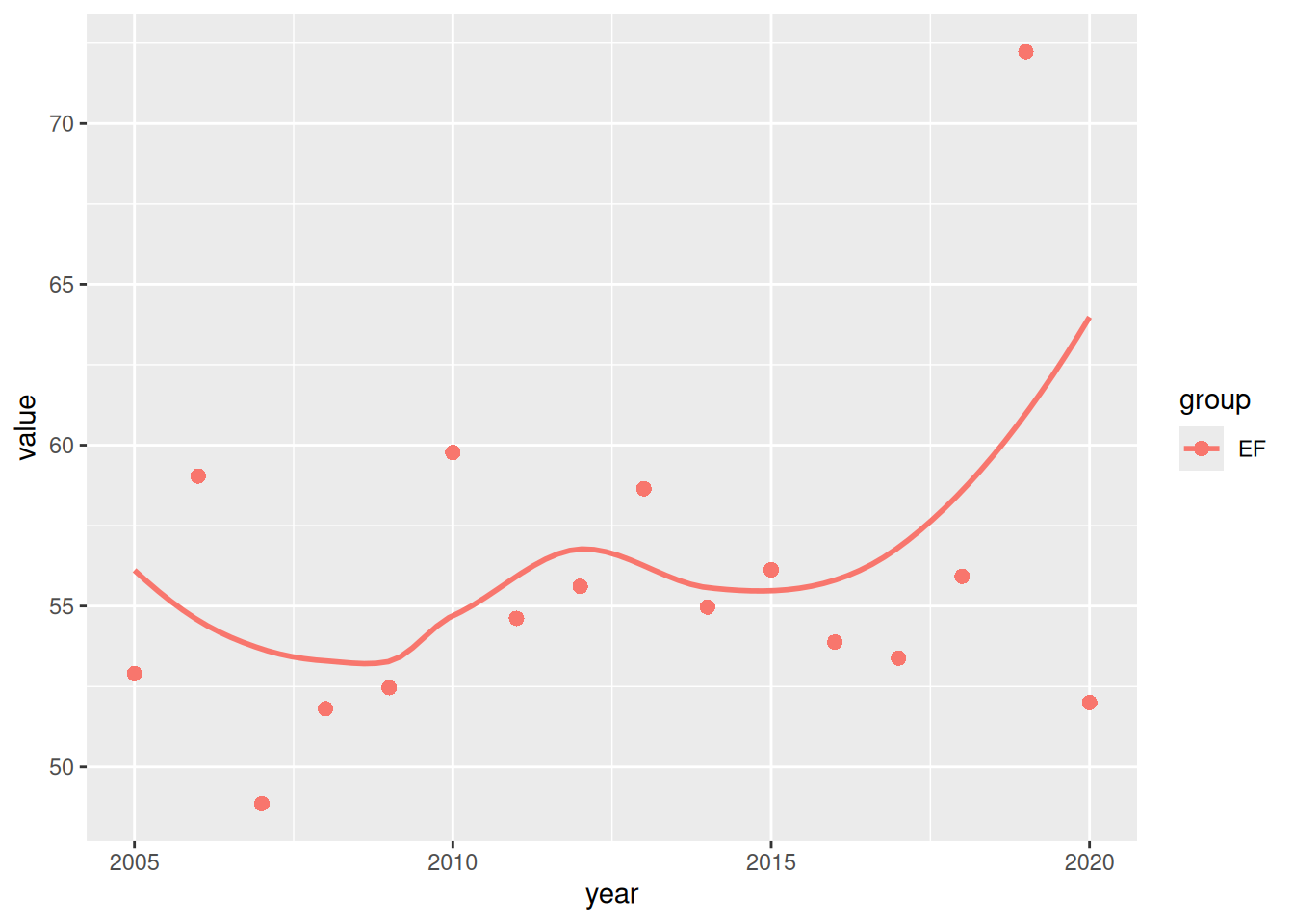
The shipped dc-trends template replaces hand-built annual summaries and per-series smooth.spline(df = 6) calls with hv_trends(). Its smoother is LOESS, not the SAS-era smoothing spline, so compare the old and new figures by shape rather than pointwise equality.
if (requireNamespace("hvtiPlotR", quietly = TRUE)) {
  d <- hvtiPlotR::sample_eda_data(n = 120)
  trend_data <- data.frame(year = d$year, value = d$ef, group = "EF")
  plot(hvtiPlotR::hv_trends(trend_data))
}
#> Warning: 10 of 120 row(s) have missing values in `value`; they will not be
#> drawn.
#> Warning: Removed 10 rows containing non-finite outside the scale range
#> (`stat_smooth()`).
EDA report: dc-eda
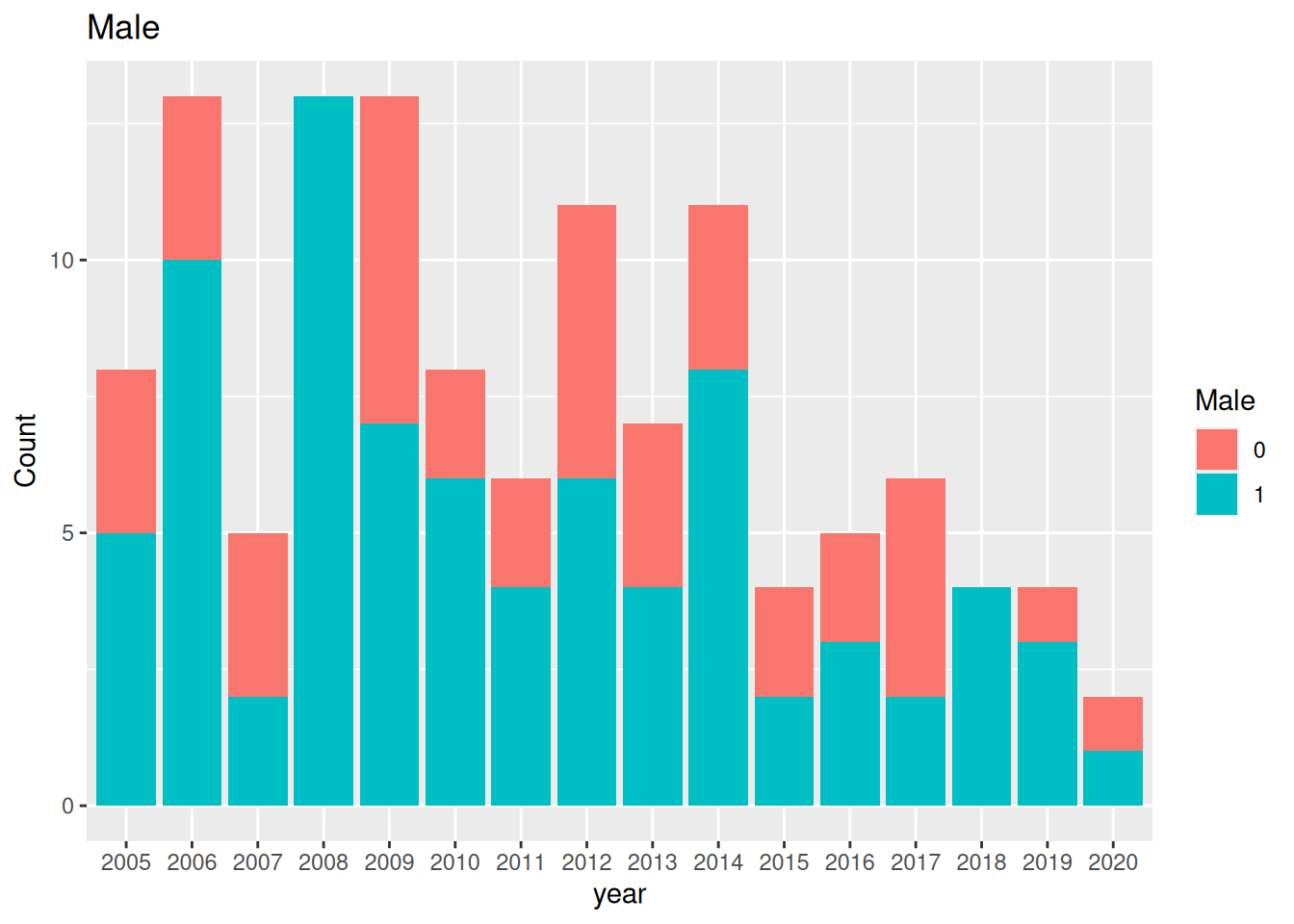
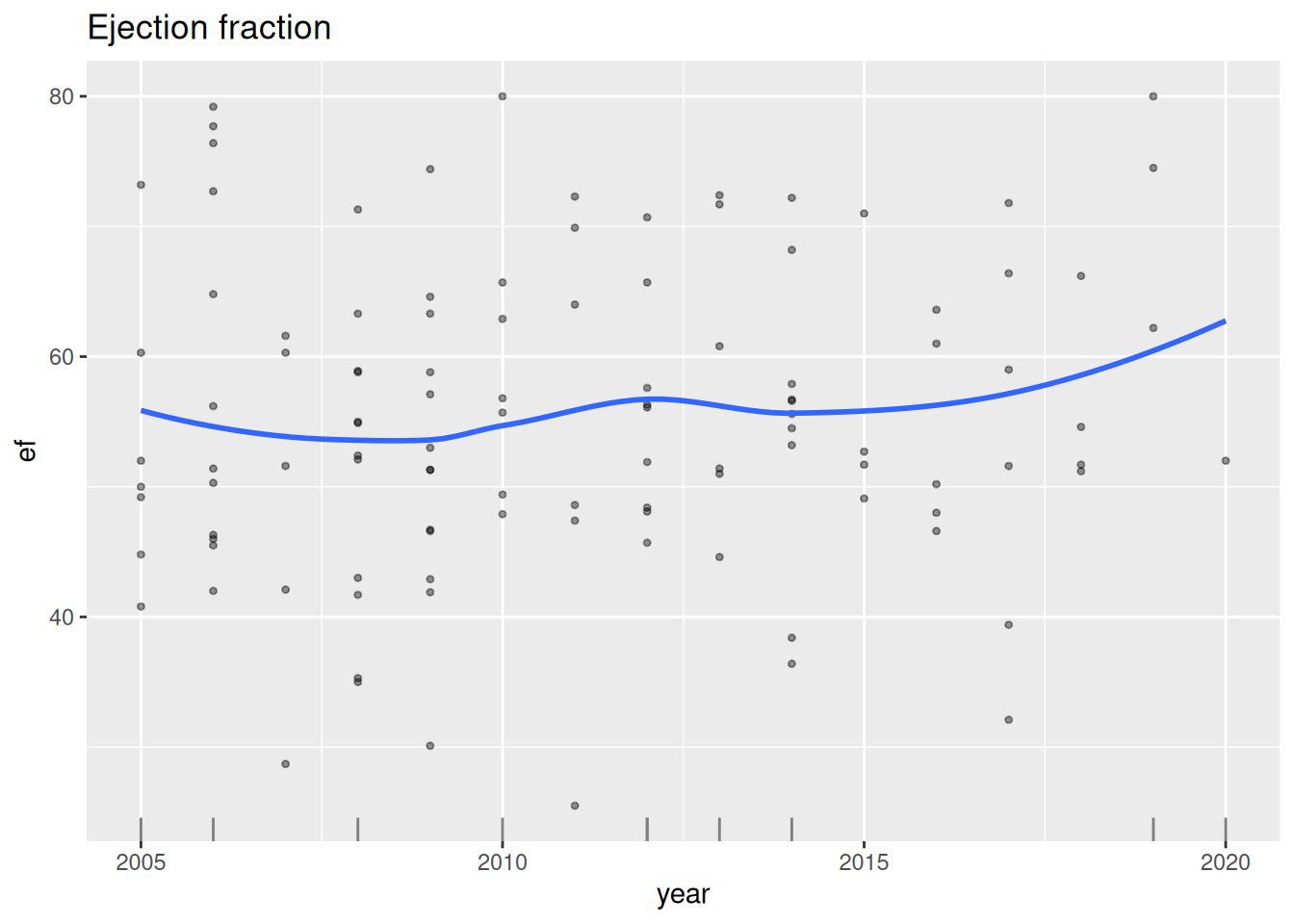
The older Function_DataPlotting() loops become one hv_eda() call per entry in VARS. Character and factor columns produce bars. A numeric column produces bars only when it has at most six distinct non-missing values and every value is a non-negative whole number no greater than six; otherwise it produces a scatter panel. The template lays those panels out in printable pages.
A legacy EDA report drew no follow-up panels, so migrate_job() writes its dc-eda job with SECTIONS <- c("continuous", "percent", "count"): the continuous, percent and count pages, each with its table. Add "followup" to draw the follow-up panels as well.
for (v in variables) Function_DataPlotting(data, v, "year")
d <- hvtiPlotR::sample_eda_data(n = 120)
variables <- c(male = "Male", ef = "Ejection fraction")
panels <- lapply(names(variables), function(v) {
  plot(hvtiPlotR::hv_eda(d, x_col = "year", y_col = v, y_label = variables[[v]]))
})
panels[[1]]
Where the numbers differ
Percentiles use SAS QNTLDEF=5, equivalent to R’s type = 2; proc_means() and the table engine already make that choice. Pin type = 2 in any hand-written quantile() call. N is the non-missing count, not always the number of rows. Continuous-variable p-values are non-parametric. Correlation intervals are 68% Fisher intervals by default. Finally, %desc_tab wrote separate categorical and continuous RTF files; the R job writes one DOCX table.
What is not ported
The templates do not reproduce RTF output; they produce DOCX and self-contained HTML instead. They also do not reproduce identified patient listings. Use the distribution summaries to assess completeness, then investigate any necessary patient-level records inside the governed study environment rather than in a portable report.