A bar chart answers a counting question. How many patients had a concomitant CABG this year? What fraction arrived in NYHA class III or IV? How did the size of each annual cohort change over the study period? Whenever the thing you want to show is a count or a proportion of a category, and you want it broken out across a second axis (usually time), the bar chart is the plain, honest display to reach for. Nobody misreads a bar.
There are two related jobs in this chapter, and the package splits them across two functions. hv_eda()(Ehrlinger 2026) is the exploratory workhorse you point at a single variable to see how its categories fall out across a reference axis; it is the same function that draws scatter plots for continuous columns, but here we stay with the categorical case where it returns bars. hv_longitudinal() is the reporting display: a grouped bar chart of how many patients and how many measurements you have at each follow-up window, the figure you put at the front of a longitudinal results section so the reader knows how much data backs the later curves.
Both hand back a bare ggplot (or, for the longitudinal table, a panel you compose with patchwork). You dress them with colour scales, labels, and a house theme using the usual +.
16.2 The data it needs
hv_eda() expects one row per observation with a reference axis in x_col (here the surgery year) and the variable of interest in y_col. It does not ask you to tell it whether that variable is categorical: eda_classify_var() inspects the column and decides. Numeric 0/1 and small-integer columns come back as "Cat_Num", character columns as "Cat_Char", and continuous columns as "Cont". The classifier is worth running on the whole frame before you build anything, so you know which columns will draw as bars and which as a scatter.
# Auto-detected types for each columnsapply(dta_eda, eda_classify_var)
       year    op_years        male        cabg        nyha valve_morph
     "Cont"      "Cont"   "Cat_Num"   "Cat_Num"   "Cat_Num"  "Cat_Char"
         ef     lv_mass   peak_grad
     "Cont"      "Cont"      "Cont"
hv_longitudinal() is fussier: it expects pre-aggregated long-format data, one row per time-window by series combination, with a count column. You do not hand it raw patient records. sample_longitudinal_counts_data() derives that shape from a simulated 300-patient registry so the recipe runs end to end.
16.3 Build it
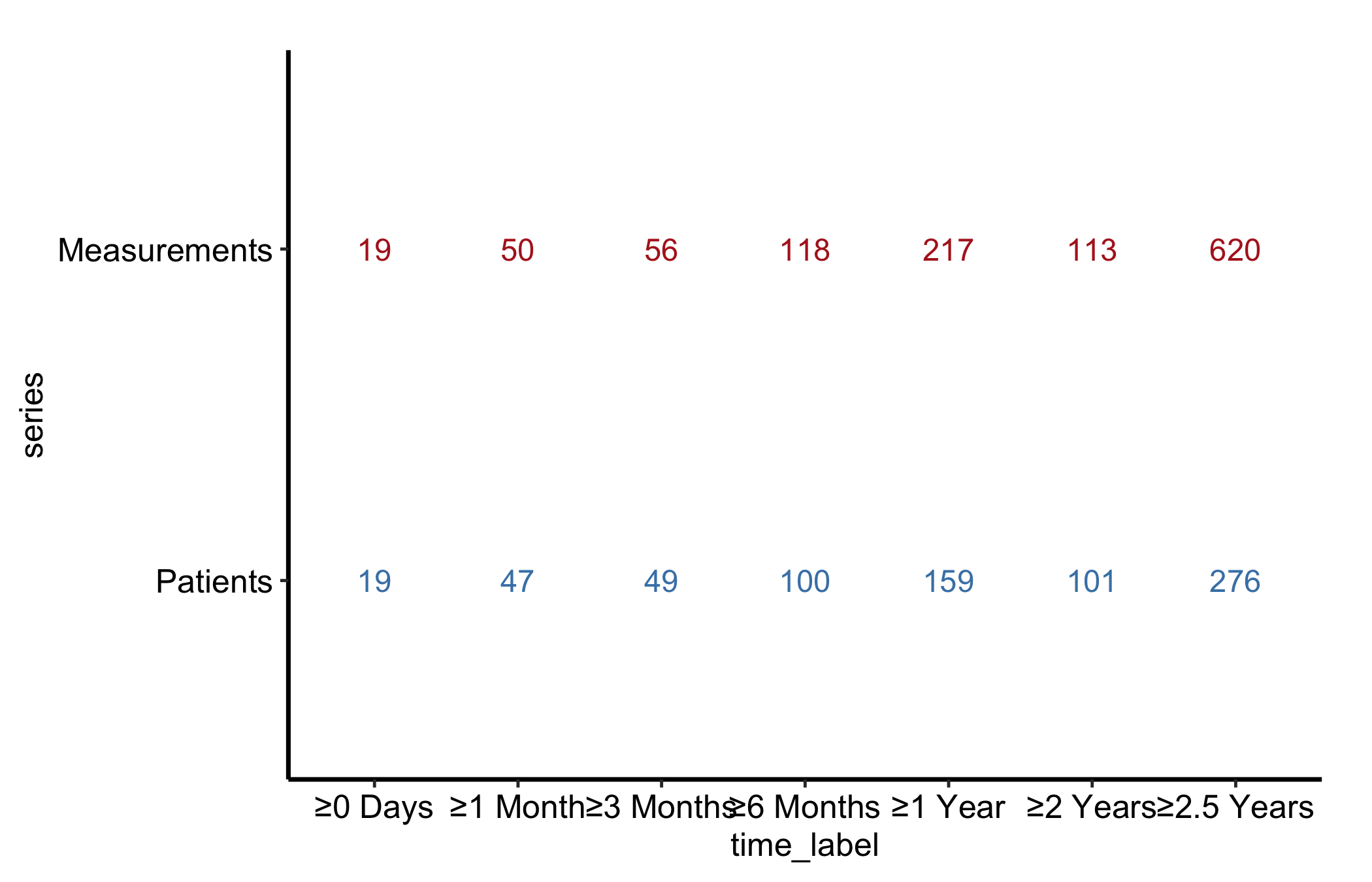
Start from the bare panel for hv_longitudinal() so you can see what the constructor produced before any styling. Build the S3 object once and reuse it across both panels below.
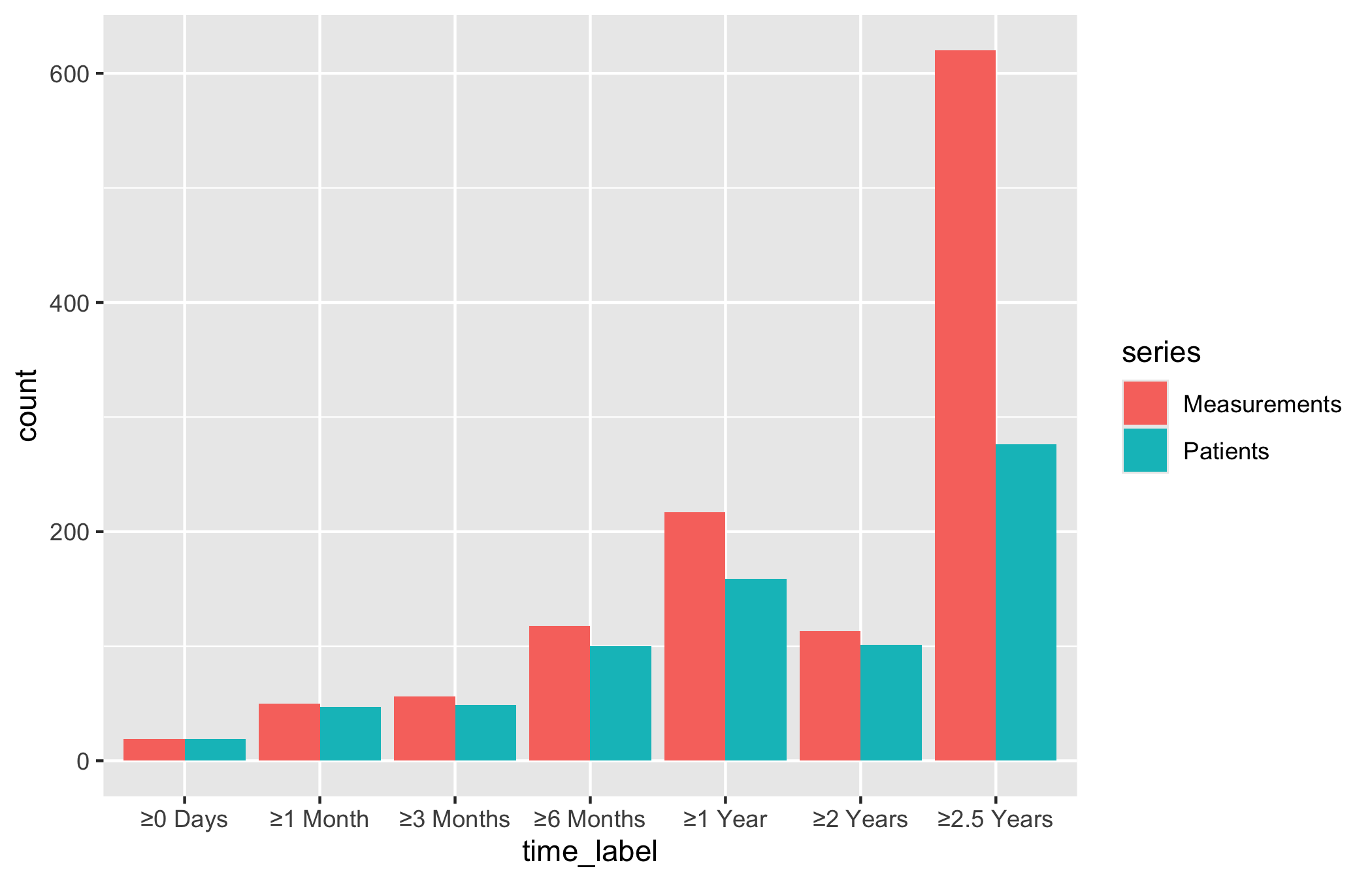
   time_label       series count
1     ≥0 Days     Patients    19
2    ≥1 Month     Patients    47
3   ≥3 Months     Patients    49
4   ≥6 Months     Patients   100
5     ≥1 Year     Patients   159
6    ≥2 Years     Patients   101
7  ≥2.5 Years     Patients   276
8     ≥0 Days Measurements    19
9    ≥1 Month Measurements    50
10  ≥3 Months Measurements    56
11  ≥6 Months Measurements   118
12    ≥1 Year Measurements   217
13   ≥2 Years Measurements   113
14 ≥2.5 Years Measurements   620
# Build the S3 object once; use for both panelslc <-hv_longitudinal(lc_dat)
plot(lc)
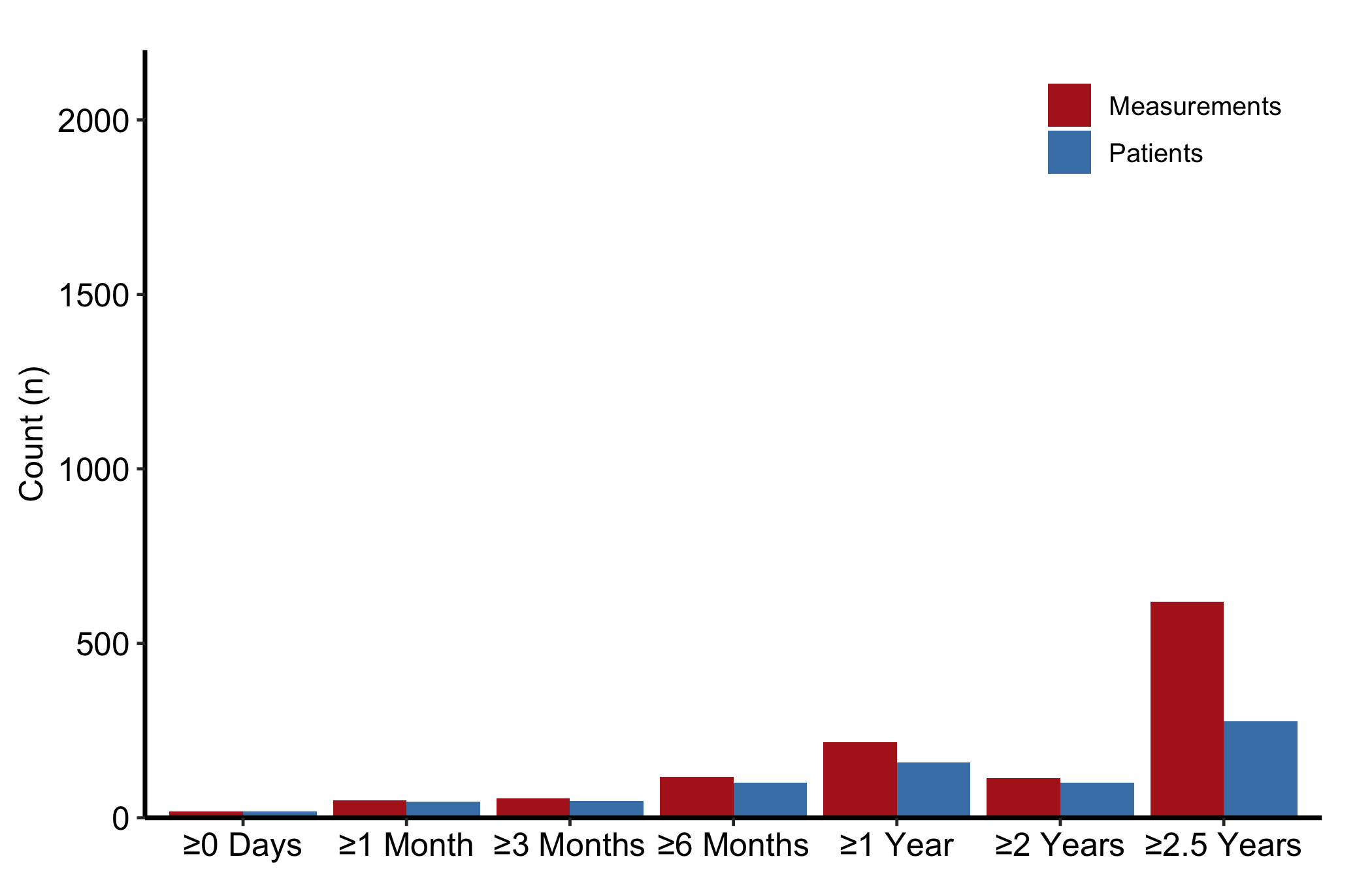
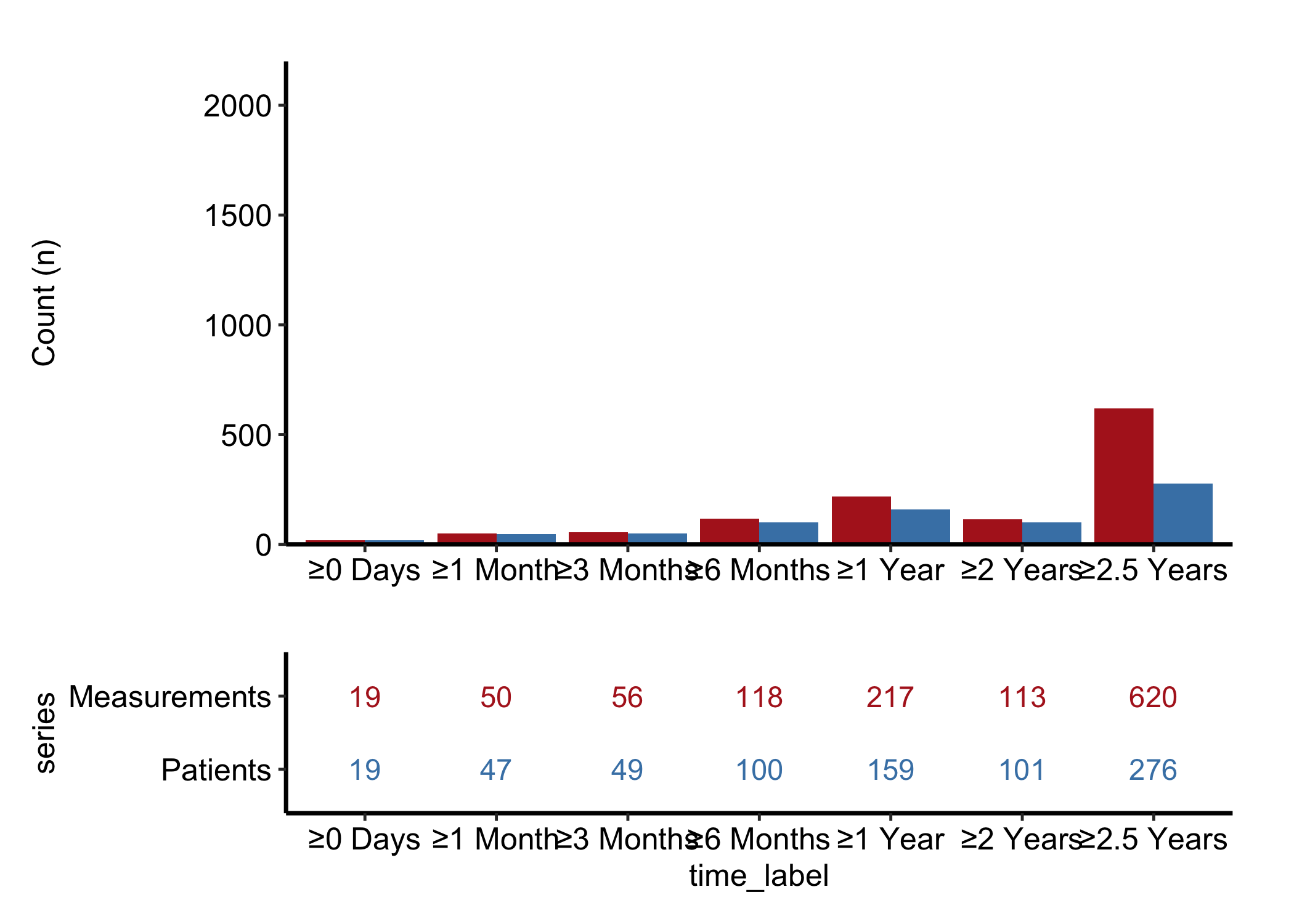
That is the raw grouped bar chart: paired bars at each follow-up window, no fill colours, no axis range, no theme. Now layer on the house style. We give the two series distinct fills, expand the y-axis with coord_cartesian() so the tallest bar has headroom, and let hv_legend_inside() drop the legend into the empty upper-right corner where the bars are short.
Figure 16.1: Grouped bar chart of patient and measurement counts at each follow-up window
16.4 Read it
A grouped count bar chart is read one window at a time. A few things to look for:
Patients should always be at least Measurements. Each patient contributes one or more measurements, never the other way round, so the Patients bar should never sit below the Measurements bar in the same window. If it does, the series_col mapping is pointing at the wrong column and the two series are swapped.
The shape of the decline. Both bars fall as you move right across follow-up windows, because patients drop out of the registry over time. A gentle taper is expected; a cliff between two windows is a data-availability artefact worth chasing down before you trust the curves built on those windows.
The gap between the two bars. A wide gap in a window means many patients there are contributing only a single measurement, which tells you how much you can lean on within-patient change in that window.
16.5 Variations
The remaining variants come from hv_eda(), which draws the single-variable exploratory bars.
16.5.1 Binary categorical: count bars
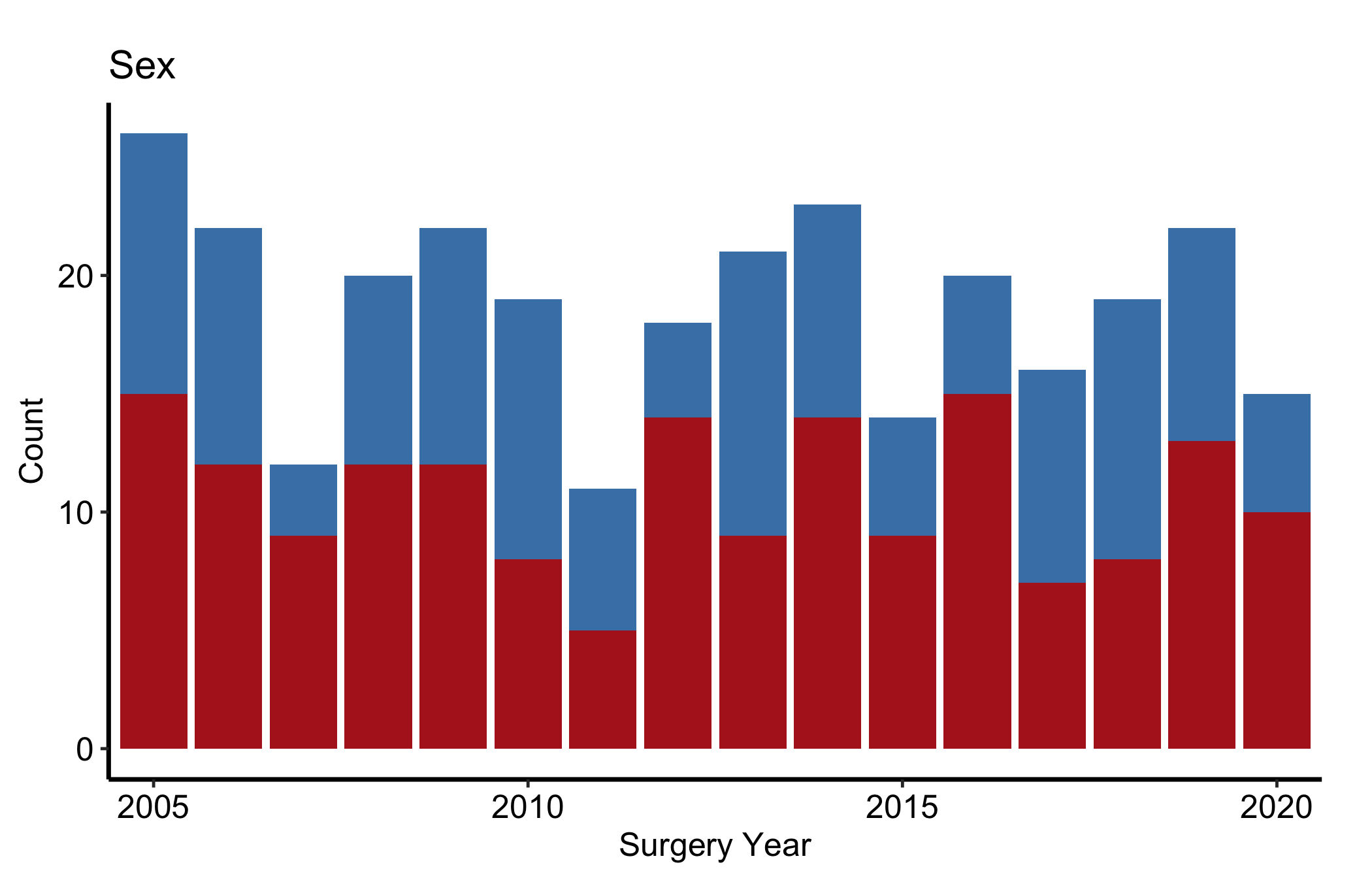
Numeric 0/1 columns are classified as "Cat_Num", and NA values appear as an explicit "(Missing)" fill level rather than vanishing, so you can colour and count them. The y_label argument sets the title and fill-legend name in place of the raw column name. Here, sex by surgery year.
Figure 16.2: Count bars of a binary categorical variable by surgery year, with missing values kept as an explicit level
16.5.2 Binary categorical: percentage bars
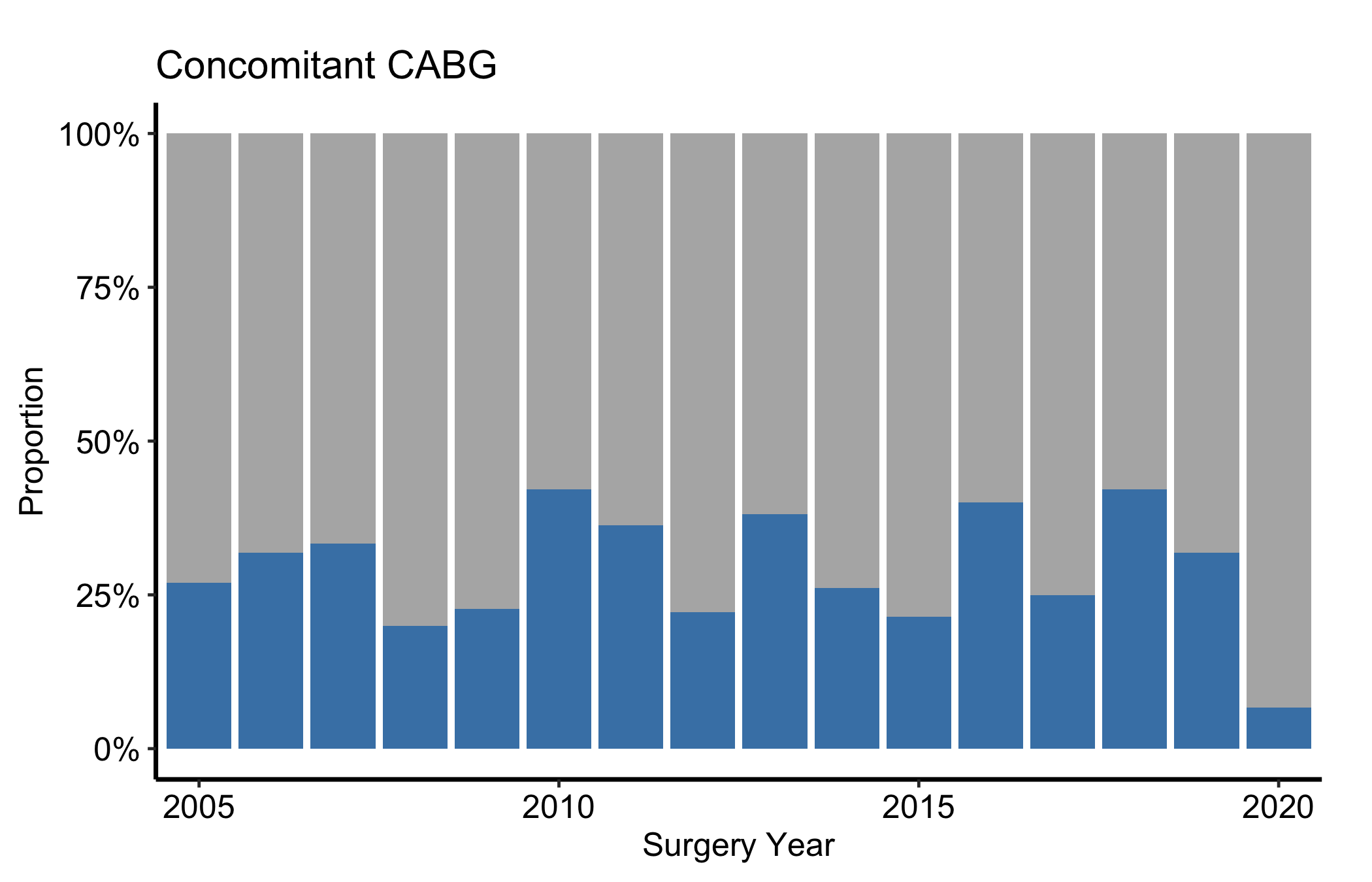
When you care about the mix rather than the absolute volume, set show_percent = TRUE. That switches geom_bar() to position = "fill", so every year’s bar runs the full height and the fill shows the proportion in each category. This is the version to use when annual cohort sizes vary a lot and a raw count would tell you more about volume than about case mix.
Figure 16.3: Percentage bars of a binary categorical variable by year, with each bar filling the full height to show case mix
16.5.3 Ordinal and multi-level categorical
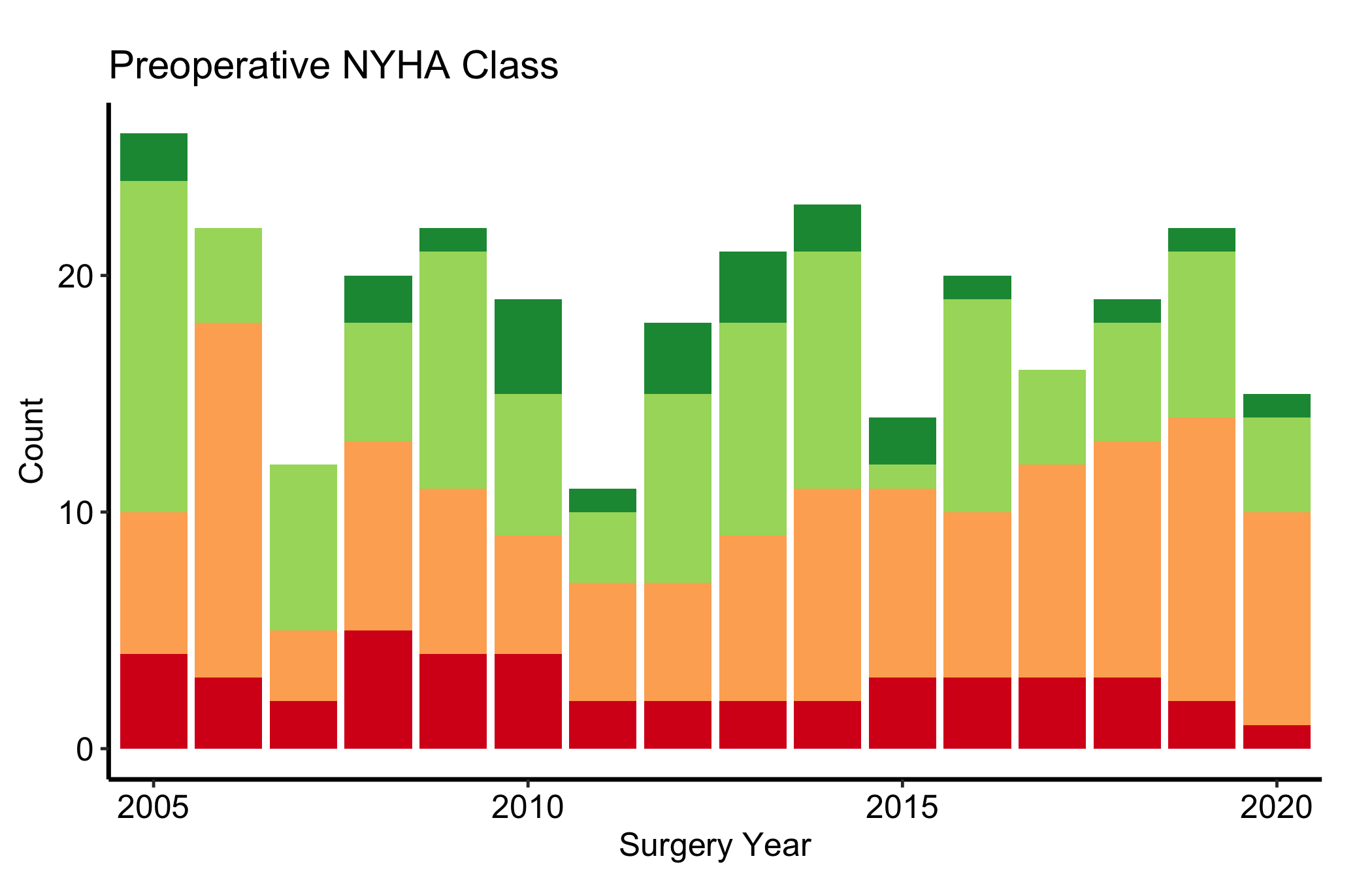
Columns with more than two numeric levels render as stacked count bars, one level per fill colour. For an ordered grade such as NYHA class, a reversed diverging palette ("RdYlGn") carries the severity ordering visually, from green at the mild end through yellow to red at the severe end, so the reader sees worsening case mix without reading the legend.
Figure 16.4: Stacked count bars of an ordinal NYHA class by year, with a diverging palette carrying the severity ordering
16.5.4 Character categorical
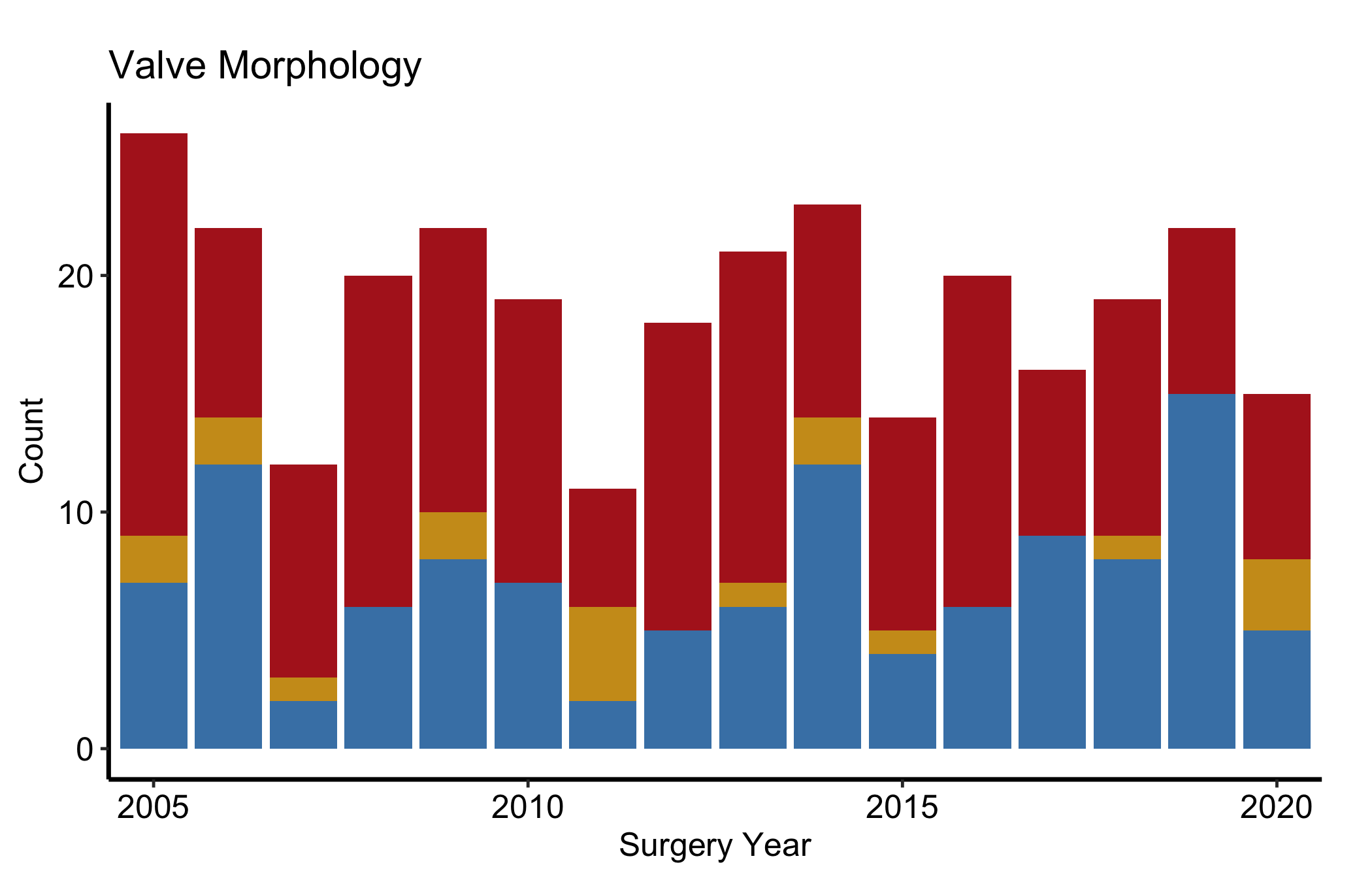
String columns are classified as "Cat_Char" and also produce stacked count bars. The difference is that character levels are ordered alphabetically by default rather than by an implied scale, so use scale_fill_manual() to assign colours that carry clinical meaning, here one hue per valve morphology type.
Figure 16.5: Stacked count bars of a character categorical variable by year, with one hue per valve morphology type
16.5.5 Longitudinal: the numeric table panel
hv_longitudinal() carries a second panel. plot(lc, type = "table") renders the same counts as coloured text below the x-axis labels, the numeric companion to the bars. On its own it is sparse; it is meant to sit under the bar chart.
Stack the bar chart above the table with patchwork’s / operator, then use plot_layout(heights = c(3, 1)) to give the bars three times the vertical space. This is the figure you actually publish: the bars carry the visual story and the table gives the reader the exact counts.
Figure 16.6: Two-panel longitudinal display with the grouped bar chart above and the matching count table below
16.6 Pitfalls
Count versus proportion. A raw count bar and a show_percent = TRUE bar answer different questions. If annual cohort sizes swing widely, a count chart can make a stable case mix look like a trend, and a percentage chart can hide a collapse in volume. Show whichever matches the claim, and say which it is.
Dropping the missing level.hv_eda() keeps NA as an explicit "(Missing)" level on purpose. Recolouring it to white or styling it away hides how much of each bar is unknown. Leave it visible, or at least account for it in the caption.
Feeding hv_longitudinal() raw records. It expects pre-aggregated one-row-per-window-per-series data. Hand it patient-level rows and the counts will be wrong without an error. Aggregate first, or use sample_longitudinal_counts_data() as the template for the shape.
Reading a stacked bar’s middle segments. Only the bottom segment of a stacked bar starts from a common baseline; the middle segments float, so their heights are hard to compare across years. If a middle category is the story, pull it out into its own binary count or percentage bar.
Ehrlinger, John. 2026. hvtiPlotR: HVTI Ggplot2 Themes and Clinical Plot Functions for the Cleveland Clinic Heart & Vascular Institute. https://github.com/ehrlinger/hvtiPlotR.